
 Know Before Your Perplexity Credits Run Out
Privacy-first desktop app that tracks your Perplexity Pro and API credits in real time. Get an alert the moment credits run low, so you never hit an out-of-credits wall mid-search.
Free 7-day trial. No sign-up, no credit card.
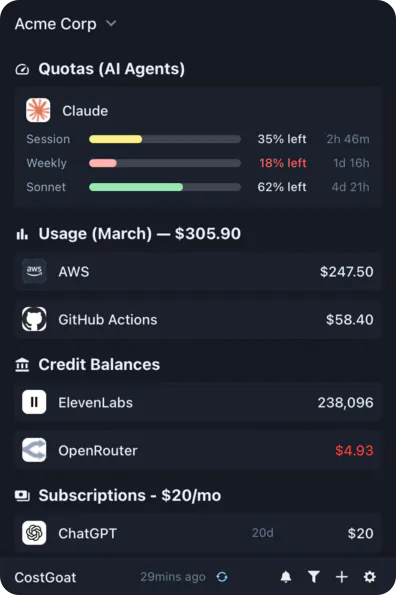
Why Track Perplexity Credits with CostGoat?
Real-Time Credit Balance
See your Perplexity Pro and API credits as they update. No more digging through settings to find out whether you have enough left for the next search.
Low Credit Alerts
Set your own thresholds and get a desktop or email alert when credits are running low. Catch it early instead of hitting an 'out of credits' wall in the middle of a task.
Usage Tracking & Trends
Track how your Perplexity credits get spent over time. See which days and models drive usage so you can plan top-ups before the balance drops.
Privacy-First Architecture
Your Perplexity API key never leaves your device. Every request runs locally, with the key encrypted using OS-native keyring technology.
Get Started in 2 Minutes
Download CostGoat
Free download for macOS, Windows, and Linux. Start your 7-day trial with no credit card required.
Add Your Perplexity API Key
Create a key in the Perplexity API settings and paste it into CostGoat via Settings, then Credentials. Your key is encrypted and stored locally, and we never see it.
How to Check Your Perplexity Credits
Sign in to Perplexity
Open Perplexity and sign in with the account you use for Pro or API access.
Open Settings and the API section
Open Settings, then go to the API section to view your API credit balance, or check the account page for Pro usage.
Read your balance and top up
Review your remaining credits, then buy more or enable automatic top-up if you are running low.
The automated alternative
Instead of opening Settings every time, CostGoat keeps your live Perplexity credits on your desktop and alerts you before you run low.
Track More Than Perplexity
CostGoat isn't just for Perplexity. Track credits, usage, and balances across the AI, SaaS, and cloud tools you already run, all from one desktop app.

Start Tracking Your Perplexity Credits Today
Join developers who use CostGoat to keep their AI costs under control.
Try Free for 7 DaysPerplexity Credits FAQ
Common questions about Perplexity credits, running low, and tracking them with CostGoat
It means the credit balance tied to your Perplexity account has run down to zero, so further API requests or credit-gated actions are blocked until you add more. You top up on the API billing page. CostGoat warns you as the balance falls so you rarely reach that point.
Sign in to Perplexity, open Settings, and go to the API section to see your API credit balance, or check your account page for Pro usage. That is a manual login each time. CostGoat surfaces the same balance on your desktop so you can see it at a glance.
Perplexity Pro's daily search and per-model limits reset every 24 hours, so a limit you hit today refills the next day. Prepaid API credits are a balance that does not reset on a schedule, you top it up when it runs low. CostGoat shows both your remaining Pro limits and your API credit balance so you know which one you are about to hit.
Purchased API credits generally stay on your account, while promotional or trial credits can carry a shorter expiry. Always check the terms shown when you receive them. CostGoat helps you watch the balance so you use free credits before they lapse.
Perplexity Pro includes a daily allotment of Pro searches plus access to advanced models, and heavy features draw on that allotment or on API credits. The exact numbers change over time, so check your account. CostGoat focuses on the credit balance side so you always know what is left.
Ready to stop manually checking your Perplexity credits?
Download CostGoat and start your 7-day free trial. No credit card required.
Try Free for 7 Days