
 Stop Refreshing Your GLM Usage Dashboard
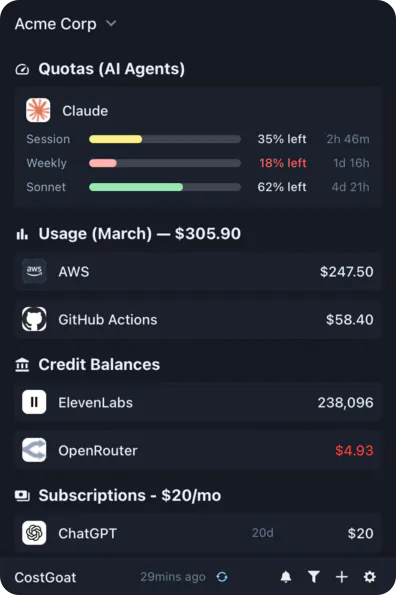
Privacy-first desktop app that tracks your GLM coding plan usage in real-time. See what is remaining and get alerts before you hit the limit, so you never lose coding momentum.
Free 7-day trial. No sign-up, no credit card.
Why Track GLM Coding Plan Usage with CostGoat?
Real-Time Usage Tracking
See how much of your GLM coding plan you have used and how much is remaining. No more refreshing the Z.ai dashboard to find out if you can keep coding.
Usage Limit Alerts
Set a threshold and get a desktop or email alert before you hit your GLM coding plan usage limit, so a blocked request never breaks your flow.
Usage Trends Over Time
Track how fast you burn through your GLM coding plan across days and reset windows, so you can size the right plan or Lite tier.
Privacy-First Architecture
Your Z.ai API key never leaves your device. All calls happen locally, encrypted with OS-native keyring technology.
Get Started in 2 Minutes
Download CostGoat
Free download for macOS, Windows, and Linux. No credit card required to start your 7-day trial.
Add Your Z.ai API Key
Create a key in your Z.ai account settings and paste it into CostGoat. Your key is encrypted and stored locally, and we never see it.
How to Check Your GLM Coding Plan Usage
Prefer the manual route? Here is where to look in the Z.ai dashboard before you switch to automatic tracking.
Sign in to Z.ai
Go to z.ai and sign in with the account tied to your GLM coding plan.
Open your coding plan usage dashboard
Open the coding plan or usage section of the dashboard to view your GLM usage for the current window.
Read your usage remaining and reset time
Check the usage-remaining figure and the reset time so you know how much of your GLM coding plan is left before the window renews.
The automated alternative
Reloading the dashboard between prompts gets old fast. CostGoat keeps your GLM usage remaining on your desktop and alerts you before you hit the limit.
Track More Than GLM
CostGoat isn't just for GLM. Track credits, usage, and balances across the AI, SaaS, and cloud tools you already run, all from one desktop app.

Start Tracking Your GLM Coding Plan Usage Today
Join developers who use CostGoat to keep their AI usage and limits under control. 7-day free trial, no credit card required.
Try Free for 7 DaysGLM Coding Plan Usage FAQ
Common questions about GLM coding plan usage limits, the Lite tier, and tracking them with CostGoat
The GLM coding plan meters usage on a rolling window rather than a hard monthly cap, and the exact prompt allowance depends on your tier. The Lite tier gets a smaller allowance than the standard coding plan. Check your Z.ai dashboard for your current window, and CostGoat keeps that number on your desktop so you always know where you stand.
Sign in at z.ai, open your coding plan or usage dashboard, and look at the usage-remaining figure and the reset time for your current window. CostGoat surfaces the same remaining usage on your desktop so you do not have to keep reloading the dashboard.
When you reach your GLM coding plan usage limit, new requests are paused until your window resets. CostGoat alerts you as you approach the limit so you can slow down or upgrade before your coding session gets blocked.
Yes. GLM coding plan API usage counts against the same allowance whether you use it through a coding tool or direct API calls, and it is throttled once you pass your window limit. CostGoat tracks that combined usage in one place.
Yes. Z.ai offers a GLM coding plan Lite tier with a lower price and a smaller usage allowance than the standard plan, which makes tracking your remaining usage more important. CostGoat helps Lite users stay under the limit without constant dashboard checks.
Ready to stop refreshing the Z.ai dashboard for your GLM usage?
Download CostGoat and start your 7-day free trial. No credit card required.
Try Free for 7 Days