
 Never Run Out of Cursor Requests Mid-Task
Privacy-first desktop app that tracks your Cursor usage and premium requests in real-time. Get alerts before your monthly limit is reached, so Cursor never drops you to slow requests mid-coding.
Free 7-day trial. No sign-up, no credit card.
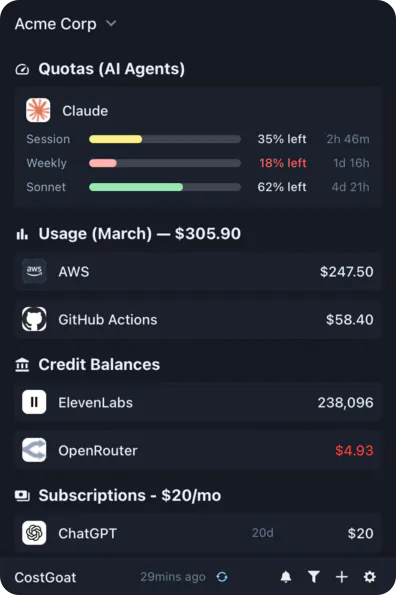
Why Track Cursor Usage with CostGoat?
Real-Time Usage & Requests
See your Cursor premium (fast) requests used and remaining as they update. No more opening the Cursor dashboard to check if you have requests left before your next prompt.
Usage Limit Alerts
Set custom thresholds and get a desktop or email alert before your monthly usage limit is reached, so Cursor never drops you to slow requests in the middle of a coding session.
Usage Tracking & Trends
Track your request consumption over time. See how fast you burn through premium requests each month and pace yourself before the reset date.
Privacy-First Architecture
Your Cursor credentials never leave your device. Everything runs locally, encrypted with OS-native keyring technology.
Get Started in 2 Minutes
Download CostGoat
Free download for macOS, Windows, and Linux. No credit card required to start your 7-day trial.
Connect Your Cursor Account
Add your Cursor credentials via Settings → Connections. They are encrypted and stored locally, we never see them, and CostGoat starts tracking your usage automatically.
How to Check Your Cursor Usage and Requests
Want to see your Cursor usage manually? Here is where to find your premium requests and requests remaining inside Cursor.
Open Cursor Settings
In Cursor, click the gear (Settings) icon in the top-right corner of the window.
Open the Usage tab
Go to the Usage (or Account) tab to see your premium (fast) requests used and remaining for the current month, along with your reset date.
Or use the online dashboard
Sign in at cursor.com/settings to view the same usage dashboard in your browser, including requests remaining and any usage-based charges.
The automated alternative
Checking the dashboard means logging in every time you wonder how many requests you have left. CostGoat keeps your Cursor usage and requests remaining visible from your desktop and alerts you before your monthly limit is reached, with no manual checking and no mid-task surprises.
Track More Than Cursor
CostGoat isn't just for Cursor. Track credits, usage, and balances across the AI, SaaS, and cloud tools you already run, all from one desktop app.

Start Tracking Your Cursor Usage Today
Join developers who use CostGoat to keep their AI costs and request limits under control. 7-day free trial, no credit card required.
Try Free for 7 DaysCursor Usage FAQ
Common questions about Cursor usage, premium requests, and tracking them with CostGoat
Open Cursor, go to Settings, and open the Usage (or Account) tab to see how many premium requests you have used this month. You can also sign in at cursor.com/settings to view your usage dashboard. CostGoat shows the same numbers on your desktop in real-time, so you don't have to open the dashboard every time.
When your Cursor usage limit is reached, you either drop to slower requests or usage-based pricing kicks in, depending on your plan and settings. Either way your fast, premium responses stop until the month resets or you enable overage billing. CostGoat alerts you before you hit that point so it never surprises you mid-task.
Premium (fast) requests are calls to Cursor's higher-end models that draw from your plan's monthly allotment. Each Cursor plan includes a set number of them, after which you move to slower requests or pay for extra usage. CostGoat tracks how many premium requests you have left so you can budget them across the month.
Cursor shows requests remaining in Settings → Usage and on the cursor.com/settings dashboard, alongside your monthly reset date. Checking it means logging in each time. CostGoat keeps your requests-remaining count visible from your menu bar and warns you as you approach the limit.
Slow requests are the queued, lower-priority responses you get after you have used up your premium (fast) requests for the month. They still work but can lag noticeably. Tracking your usage with CostGoat helps you avoid being pushed onto slow requests at the worst possible moment.
Ready to stop manually checking your Cursor usage?
Download CostGoat and start your 7-day free trial. No credit card required.
Try Free for 7 Days