
 Stop Checking the OpenAI Usage Dashboard
Privacy-first desktop app that tracks your OpenAI API credits and usage in real-time. Get alerts before you hit your quota, so you never run out mid-request.
Free 7-day trial. No sign-up, no credit card.
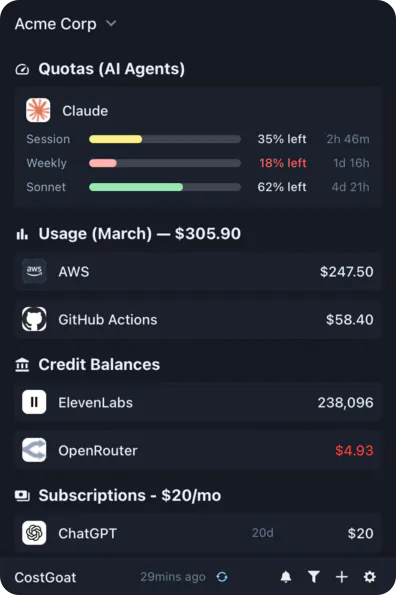
Why Track OpenAI API Credits with CostGoat?
Real-Time Credit Balance
See your OpenAI API credit balance and remaining usage as they update. No more opening platform.openai.com to check if you have enough left for your next request.
Low Credit & Quota Alerts
Set custom thresholds and get a desktop or email alert before you run dry. Avoid the 'You exceeded your current quota' error breaking a job mid-run.
Usage Tracking & Trends
Track your API usage over time. See how much you're spending across GPT-5, GPT-4o, and other models so you can spot spikes before the bill does.
Privacy-First Architecture
Your OpenAI API key never leaves your device. All API calls happen locally, encrypted with OS-native keyring technology.
Get Started in 2 Minutes
Download CostGoat
Free download for macOS, Windows, and Linux. No credit card required to start your 7-day trial.
Add Your OpenAI API Key
Create a key at platform.openai.com/api-keys and paste it into CostGoat. Your key is encrypted and stored locally, and we never see it.
How to Check Your OpenAI Credit Balance and Usage
To check it manually in the OpenAI dashboard, follow these steps:
Sign in at platform.openai.com
Log in with the account that owns your API keys, then open the Settings menu.
Open Settings → Organization → Billing
The Billing page shows your prepaid credit balance and payment settings. This is where "credits remaining" actually lives.
Open Settings → Usage for consumption
The Usage page breaks down spend by day and model, and Settings → Limits shows the monthly hard limit that triggers "billing hard limit reached".
The automated alternative
Doing this by hand means logging into the dashboard every time you want a number. CostGoat reads the same balance and usage automatically and keeps it on your desktop, then alerts you before you hit your quota, so you stop checking and never get surprised by an empty balance.
Track More Than OpenAI
CostGoat isn't just for OpenAI. Track credits, usage, and balances across the AI, SaaS, and cloud tools you already run, all from one desktop app.

Start Tracking Your OpenAI API Credits Today
Join developers who use CostGoat to keep their AI costs under control.
OpenAI Credits FAQ
Common questions about OpenAI API credits, quota errors, and tracking them with CostGoat
The 'You exceeded your current quota' error (error code insufficient_quota) means your OpenAI account has no usable credit balance or has hit its spending limit. You need to add credits or raise your limit at platform.openai.com under Settings → Billing. CostGoat alerts you before your balance runs out so you can top up before this error interrupts your API calls.
Sign in at platform.openai.com, open Settings → Organization → Billing to see your prepaid credit balance, and check Settings → Usage for a breakdown of API spend by day and model. That means logging in every time you want a number. CostGoat shows your OpenAI credit balance and usage live from your desktop, no browser needed.
Yes. Prepaid credits you purchase for the OpenAI API generally expire one year after purchase, while promotional or free trial credits expire much sooner (often 3 months). CostGoat tracks your balance so you can use credits before they expire and never lose paid-for credit.
OpenAI lets you set a monthly hard limit on API spend. Once usage reaches it, requests fail with a 'billing hard limit reached' message until the next cycle or until you raise the limit in Settings → Limits. CostGoat's usage alerts warn you as you approach your hard limit so a running workload doesn't stop unexpectedly.
New OpenAI API accounts have at times received a small amount of free credit (commonly cited as $5) that expires after a few months, though availability changes over time. For current OpenAI API rates and what your credits actually buy, see our OpenAI API pricing calculator. CostGoat tracks any free or paid credits you hold so you know exactly when to top up.
Ready to stop manually checking your credits?
Download CostGoat and start your 7-day free trial. No credit card required.
Try Free for 7 Days