
 Never Hit Your ChatGPT Limit Unaware
Privacy-first desktop app that tracks your ChatGPT Plus and Pro message usage in real-time. Know how many messages you have left before you hit the cap.
Free 7-day trial. No sign-up, no credit card.
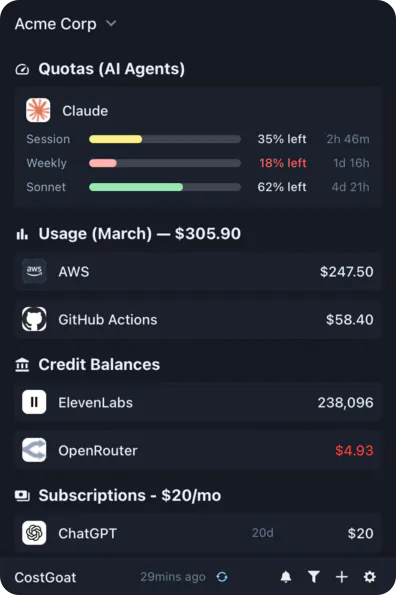
Why Track Your ChatGPT Usage with CostGoat?
Real-Time Usage & Message Count
See how many messages you have left on your ChatGPT Plus or Pro plan without guessing when your next cap resets. Know where you stand before you start a long session.
Limit Alerts
Get a desktop or email alert as you approach your plan's message cap so you never hit 'you've reached your limit' in the middle of an important task.
Usage Tracking & Trends
Track your ChatGPT usage over time. See your busiest days and how close you run to your Plus or Pro message limits in each rolling window.
Privacy-First Architecture
Your ChatGPT data stays on your device. CostGoat tracks your usage locally and never sends your conversations or account details to our servers.
Get Started in 2 Minutes
Download CostGoat
Free download for macOS, Windows, and Linux. No credit card required to start your 7-day trial.
Set Your ChatGPT Plan
Tell CostGoat whether you are on Free, Plus, or Pro so it knows your message caps and rate limits. Everything stays on your device.
How to Check Your ChatGPT Usage and Message Limits
OpenAI does not show a live usage meter, so here is how to work out your ChatGPT message limits by hand.
Check your ChatGPT plan
Open ChatGPT, click your profile, and go to Settings to confirm whether you are on Free, Plus, or Pro.
Learn your plan's message caps
Each plan has its own limits. Free has the tightest caps, while Plus and Pro allow far more messages per model within each rolling window.
Watch for the limit notice
When you reach a cap, ChatGPT shows a 'you've reached your limit' message along with the time your limit resets.
The automated alternative
OpenAI has no live usage meter, so guessing your remaining messages is a gamble. CostGoat counts your messages against your plan's caps and warns you before you run out.
Track More Than ChatGPT
CostGoat isn't just for ChatGPT. Track credits, usage, and balances across the AI, SaaS, and cloud tools you already run, all from one desktop app.

Start Tracking Your ChatGPT Usage Today
Join people who use CostGoat to stay ahead of their ChatGPT message limits and keep working without interruption.
Try Free for 7 DaysChatGPT Usage FAQ
Common questions about ChatGPT message limits, usage caps, and tracking them with CostGoat
OpenAI has no live usage dashboard, so you cannot see an exact count inside ChatGPT. You only find out when you hit the cap. CostGoat fixes this by counting your messages against your plan's known limits and showing your remaining usage on your desktop.
ChatGPT Plus gives you a set number of messages per model within a rolling window (for example, a capped number of GPT-5 messages every few hours), well above the Free tier. The exact numbers change over time and are not shown in the app, which is why CostGoat tracks your usage against them for you.
It means you have used all the messages your plan allows for that model in the current window. ChatGPT usually shows a reset time when you can send more. CostGoat warns you before you reach this point so it does not interrupt your work.
The Free tier has the tightest caps and drops you to a smaller model once you hit them. OpenAI does not publish an exact live count, so CostGoat estimates your remaining Free tier usage and alerts you as you approach the limit.
No. ChatGPT has no meter for remaining messages, so you only learn you are out when the cap notice appears. CostGoat surfaces your remaining usage on your desktop so you are never caught out mid-task.
Ready to stop guessing how many ChatGPT messages you have left?
Download CostGoat and start your 7-day free trial. No credit card required.
Try Free for 7 Days