
 Never Hit a DeepSeek 402 Mid-Run
Privacy-first desktop app that tracks your DeepSeek API balance in real-time. Get alerted before your credits run out, so an "Insufficient Balance" error never stops your requests.
Free 7-day trial. No sign-up, no credit card.
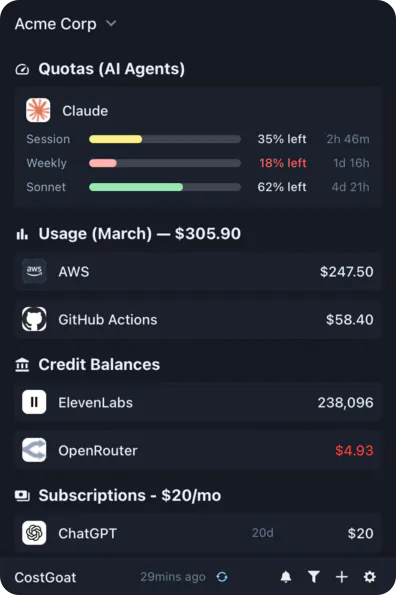
Why Track DeepSeek Credits with CostGoat?
Real-Time Balance
See your DeepSeek balance update as you use the API. No more opening the platform dashboard to check how much credit is left before a big run.
Alerts Before You Hit 402
Set a threshold and get notified before your balance runs out, so you top up ahead of the '402 Insufficient Balance' error instead of after your requests start failing.
Usage Tracking & Trends
Watch your balance draw down over time so you can see how fast you burn credits and plan top-ups instead of reacting to them.
Privacy-First Architecture
Your DeepSeek API key never leaves your device. Every call to the balance API happens locally, and the key is encrypted with OS-native keyring storage.
Get Started in 2 Minutes
Download CostGoat
Free download for macOS, Windows, and Linux. No credit card required to start your 7-day trial.
Add Your DeepSeek API Key
Create a key at platform.deepseek.com/api_keys and paste it into CostGoat. It is the official API key, not a session login, and it stays encrypted on your device.
Track More Than DeepSeek
CostGoat isn't just for DeepSeek. Track credits, usage, and balances across the AI, SaaS, and cloud tools you already run, all from one desktop app.

Start Tracking Your DeepSeek Balance Today
Join developers who use CostGoat to keep their AI costs under control. 7-day free trial, no credit card required.
Try Free for 7 DaysDeepSeek Credits FAQ
Common questions about DeepSeek balance, credits, and the 402 Insufficient Balance error
The DeepSeek API runs on a prepaid balance. You add credits, and every call deducts from that balance based on the input and output tokens it uses. Your balance is the sum of granted credits and topped-up credits, and once it reaches zero, requests stop going through.
Granted balance is free or promotional credit DeepSeek adds to your account; topped-up balance is what you paid for. The balance API reports them as separate fields, and your total balance is the two combined. Granted credit is generally spent first and can carry an expiry date, while paid credit stays until you use it.
You can open the usage page at platform.deepseek.com, or call the balance endpoint directly at GET https://api.deepseek.com/user/balance with your API key as a Bearer token. CostGoat runs that call for you and keeps your live balance on your desktop, so you never have to log in to check.
DeepSeek returns HTTP 402 with an 'Insufficient Balance' message once your account balance reaches zero, and every request fails until you top up. It usually lands mid-workflow with no warning. CostGoat watches your balance and alerts you at a threshold you choose, so you refill before the 402 ever shows up.
Topped-up credits that you paid for do not expire and stay on your account until they are used. Granted or promotional credits often come with an expiry date set by DeepSeek. CostGoat shows your combined balance so you can spend expiring credit first.
Ready to stop manually checking your balance?
Download CostGoat and start your 7-day free trial. No credit card required.
Try Free for 7 Days