
 Stop Guessing How Many Grok Credits Are Left
Privacy-first desktop app that tracks your Grok usage limits and xAI API credits in real-time. Get alerts before you run out, so a rate limit never stops you mid-prompt.
Free 7-day trial. No sign-up, no credit card.
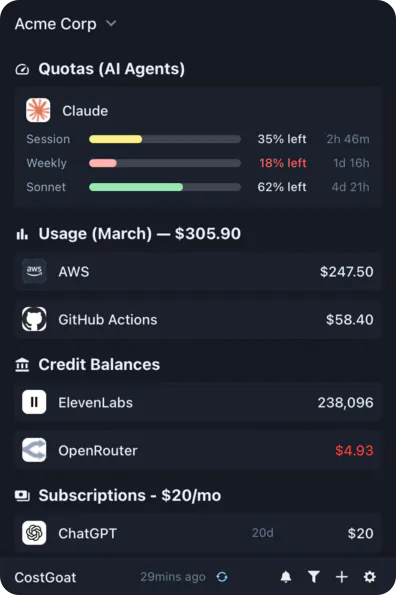
Why Track Grok Limits & Credits with CostGoat?
Real-Time Limit & Credit Tracking
See your Grok usage limits and xAI API credit balance as they change. No more opening the console to guess how much you have left before your next request.
Low Balance Alerts
Set a threshold and get a desktop or email alert before your Grok credits run out. Avoid hitting a rate limit or running dry in the middle of a prompt.
Usage Tracking & Trends
Watch how fast you burn through Grok credits over time. See which models eat the most so you can plan around free credits and monthly limits.
Privacy-First Architecture
Your xAI API key never leaves your device. All calls happen locally, encrypted with OS-native keyring technology.
Get Started in 2 Minutes
Download CostGoat
Free download for macOS, Windows, and Linux. No credit card required to start your 7-day trial.
Add Your xAI API Key
Create a key in the xAI developer console at console.x.ai and paste it into CostGoat. Your key is encrypted and stored locally, and we never see it.
How to Check Your Grok Limits & Credits
Prefer the manual route? Here is where to look in Grok and the xAI console before you switch to automatic tracking.
Check your Grok chat usage limits
Open Grok in the X app or at grok.com and look at the usage limits shown for your plan. Free, SuperGrok, and higher tiers each reset on a rolling window.
Sign in to the xAI developer console
Go to console.x.ai and sign in with your xAI account to reach the developer dashboard for API access.
Open the billing and credits page
Open the billing or credits section to see your remaining xAI API credit balance, plus any free or promotional credits on your account.
The automated alternative
Instead of opening the X app and the xAI console every time, CostGoat keeps your live Grok usage limits and xAI credit balance on your desktop and warns you before you run low.
Track More Than Grok
CostGoat isn't just for Grok. Track credits, usage, and balances across the AI, SaaS, and cloud tools you already run, all from one desktop app.

Start Tracking Your Grok Limits & Credits Today
Join developers who use CostGoat to keep their AI costs and limits under control. 7-day free trial, no credit card required.
Try Free for 7 DaysGrok Limits & Credits FAQ
Common questions about Grok usage limits, xAI API free credits, and tracking them with CostGoat
xAI has run free and promotional API credit programs through the developer console at console.x.ai, and SuperGrok plans include a monthly credit allowance. Terms change often, so check your console for the current balance. CostGoat tracks whatever free credits you receive so you always know how much is left.
Sign in to the xAI developer console at console.x.ai and open the billing or credits page to see your API credit balance. For Grok chat usage limits, check the limits shown in the X app or on grok.com. CostGoat surfaces your balance on the desktop so you do not have to log in each time.
Grok is billed two ways: a monthly subscription for Grok in the X app and SuperGrok, and pay-as-you-go xAI API pricing charged per token. See our Grok API pricing calculator at /pricing/grok-api for a full cost breakdown. CostGoat then tracks what you actually spend against your limits.
When you reach a Grok chat limit, new messages are blocked until the limit resets, usually on a rolling window. On the xAI API, requests fail once your credit balance runs out until you top up. CostGoat alerts you before you get there so a limit never stops you mid-task.
Yes. You can add or buy more xAI API credits from the billing section of console.x.ai, and higher SuperGrok tiers come with larger credit allowances. CostGoat warns you when you are close to zero so you can top up before requests start failing.
Ready to stop guessing how many Grok credits you have left?
Download CostGoat and start your 7-day free trial. No credit card required.
Try Free for 7 Days