
 Stop Guessing How Many Abacus.AI Credits You Have Left
Privacy-first desktop app that tracks your Abacus.AI credits and ChatLLM compute points in real time. Know exactly how many you have left before you start a heavy session.
Free 7-day trial. No sign-up, no credit card.
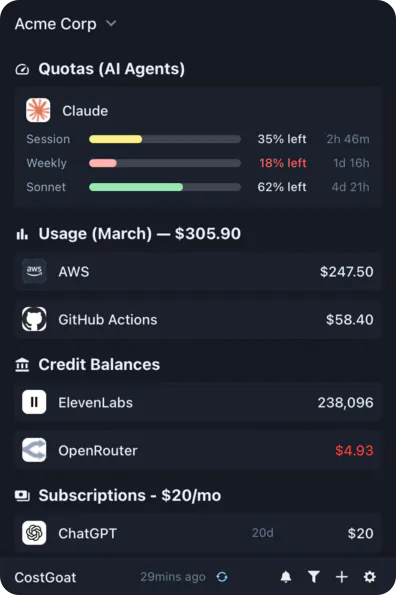
Why Track Abacus.AI Credits with CostGoat?
Real-Time Credit Balance
See your Abacus.AI credits and ChatLLM compute points as they update. No more digging through the dashboard to find out how many credits you have left.
Low Credit Alerts
Set a threshold and get a desktop or email alert before you hit your Abacus.AI credit limit, so a long ChatLLM session never stops halfway through.
Usage Tracking & Trends
Track how fast you burn compute points over time. See which models and prompts eat the most credits and plan around your monthly reset.
Privacy-First Architecture
Your Abacus.AI credentials never leave your device. Everything runs locally, encrypted with OS-native keyring technology.
Get Started in 2 Minutes
Download CostGoat
Free download for macOS, Windows, and Linux. Install it and open the app in under two minutes.
Connect Your Abacus.AI Account
Add your Abacus.AI credentials in Settings. They are encrypted and stored locally, and we never see them.
How to Check Your Abacus.AI Credits
Want to check your compute points by hand? Here is where to look in the Abacus.AI dashboard.
Sign in to Abacus.AI
Go to abacus.ai or open the ChatLLM app and log in to your account.
Open your account menu
Click your profile avatar in the top-right corner to open the account menu.
Go to Usage or Billing
Select Usage or Billing to open the compute points panel for your plan.
Review your compute points
See how many credits and compute points you have left and the date they reset.
The automated alternative
Instead of logging in to the dashboard every time, CostGoat keeps your live Abacus.AI credits on your desktop and warns you before you hit your credit limit.
Track More Than Abacus.AI
CostGoat isn't just for Abacus.AI. Track credits, usage, and balances across the AI, SaaS, and cloud tools you already run, all from one desktop app.

Start Tracking Your Abacus.AI Credits Today
Join developers who use CostGoat to keep their AI credits under control and never get cut off mid-session.
Try Free for 7 DaysAbacus.AI Credits FAQ
Common questions about Abacus.AI credits, ChatLLM compute points, and tracking them with CostGoat
Abacus.AI ChatLLM plans include a monthly allotment of compute points rather than a fixed number of messages. Each model spends points at a different rate, so a heavy Opus or GPT session drains them faster than a light one. Check your account for your current plan amount, and use CostGoat to watch how many you have left.
Your credit limit is the pool of compute points your ChatLLM plan grants each cycle. Once you spend them, higher-cost models are throttled until the pool resets or you top up. CostGoat alerts you before you reach that limit so you are not cut off mid-task.
Abacus.AI uses compute points as credits. Every ChatLLM request deducts points based on the model you choose and the length of the input and output, so premium models cost far more per message than lightweight ones. Points draw down in real time and refresh on your billing cycle.
Compute points are the credits behind ChatLLM Teams. Instead of counting messages, Abacus.AI charges points per request scaled to the model and token count. That is why the same monthly plan lasts much longer on cheaper models than on the most powerful ones.
Sign in to Abacus.AI, open your account menu, and go to the Usage or Billing panel to see your remaining compute points and reset date. CostGoat shows the same balance on your desktop so you do not have to open the dashboard every time.
Ready to stop guessing how many credits you have left?
Download CostGoat and start your 7-day free trial. No credit card required.
Try Free for 7 Days